A wholesale price for every B2B company.
Give each company its own rate on Shopify Basic, Grow and Advanced, with rates per product group, volume breaks and rules per branch. Applied in Shopify's own cart and checkout.
The problem
B2B is on your plan. Per-customer prices are not.
Shopify opened B2B to Basic, Grow and Advanced in April 2026. Two limits follow, and we reproduced both on a Grow store.
No catalog for one company
A catalog assigned to a company location cannot be set to active on these plans, so no single customer gets their own price.
Three catalogs, shared
B2B markets share at most three active catalogs: price levels for groups of customers, not a rate per customer.
The workarounds cost margin
Put a customer on the wrong price level, turn them away, or hand-edit every order.
Features
Everything a wholesale price list needs.
Only buyers signed in to a company account get wholesale prices. Everyone else pays your normal price.
Company list
Find a company and price it in place
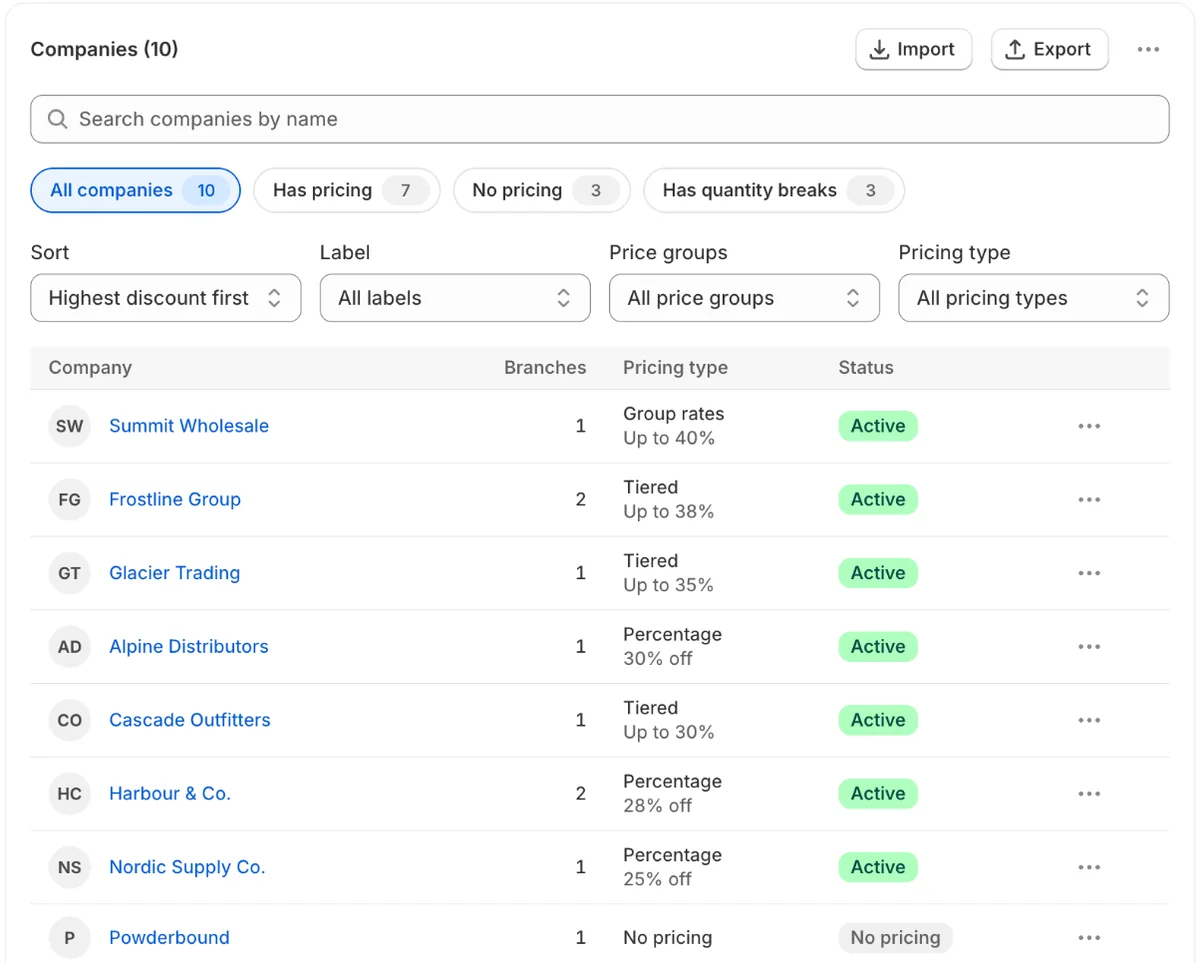
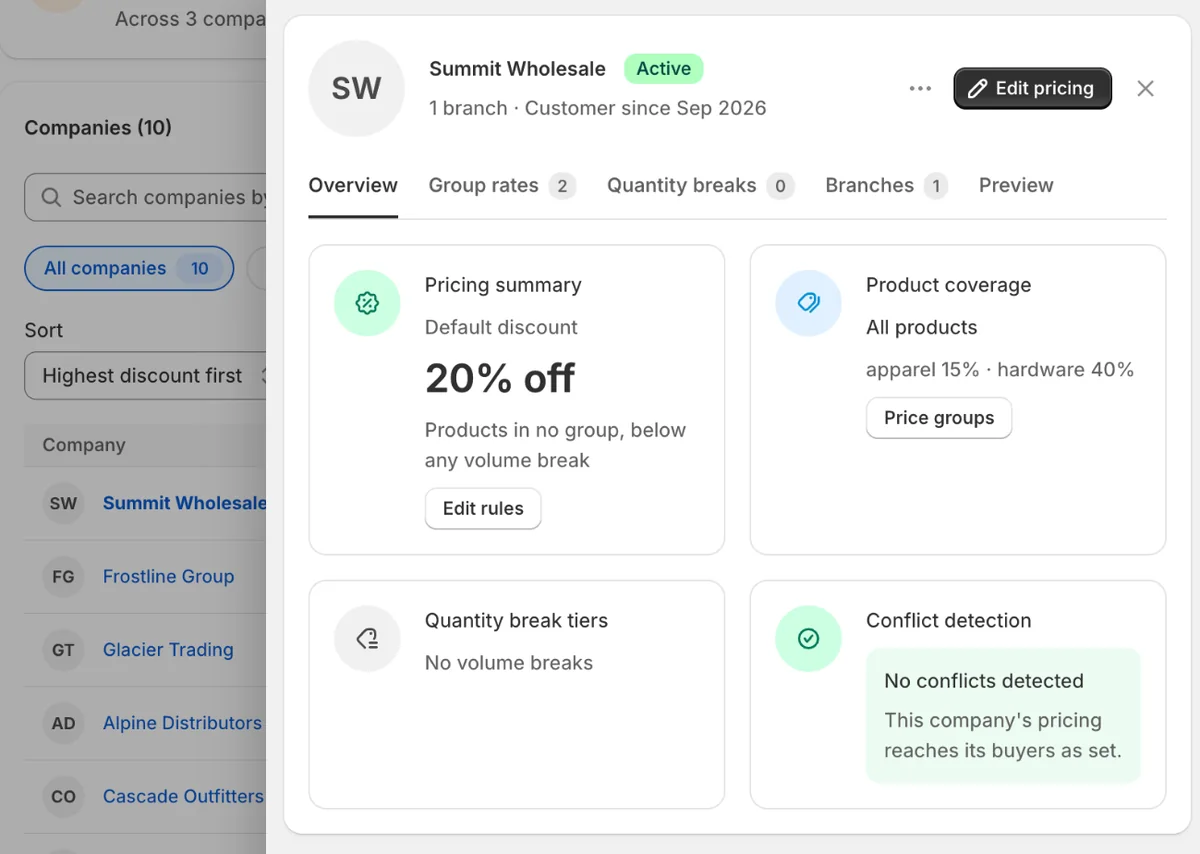
Search, filter and sort your B2B companies, open one in a side panel, and edit its pricing in a window without leaving the list.
- Filter by pricing, label, price group or pricing type
- Sort by name, highest discount, newest customer or most branches
- The panel shows the company's rates, breaks and branches
Per company
Set a rate for each company
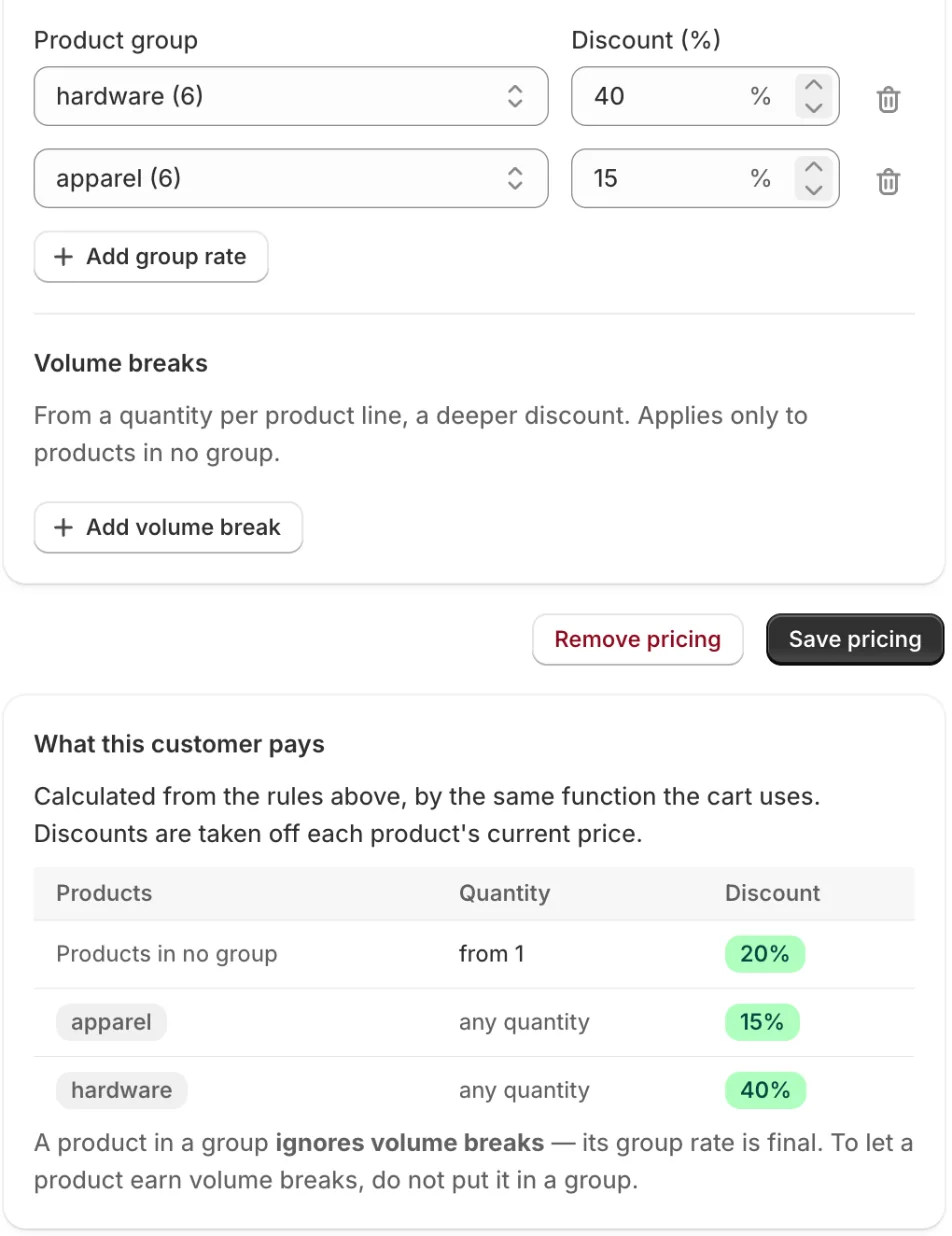
Open a company, set its discount and save. Below the form, the app shows what that customer will pay, calculated by the same function the cart runs.
- A default discount for everything they buy, with no cap on how many companies you price
- Your own name for the discount line, such as "Partner pricing"
- Check every product group and quantity band before any buyer sees it
Product groups
Different rates for different products
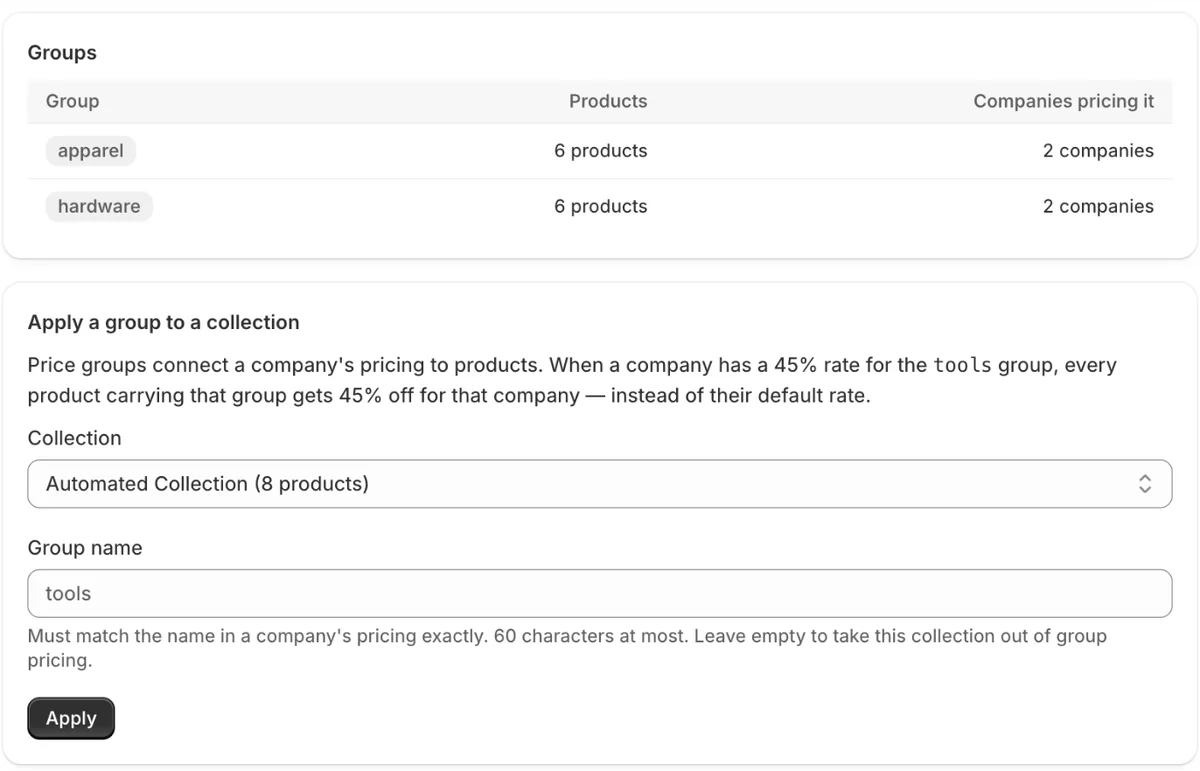
Turn your collections into price groups, then give each company a rate per group: hardware at 40%, apparel at 15%.
- Up to 50 groups, built from collections
- A group's rate is final: volume breaks never cut into a low-margin group
- The app tells you when a product moves from one group to another
Volume breaks
Deeper discounts for bigger orders
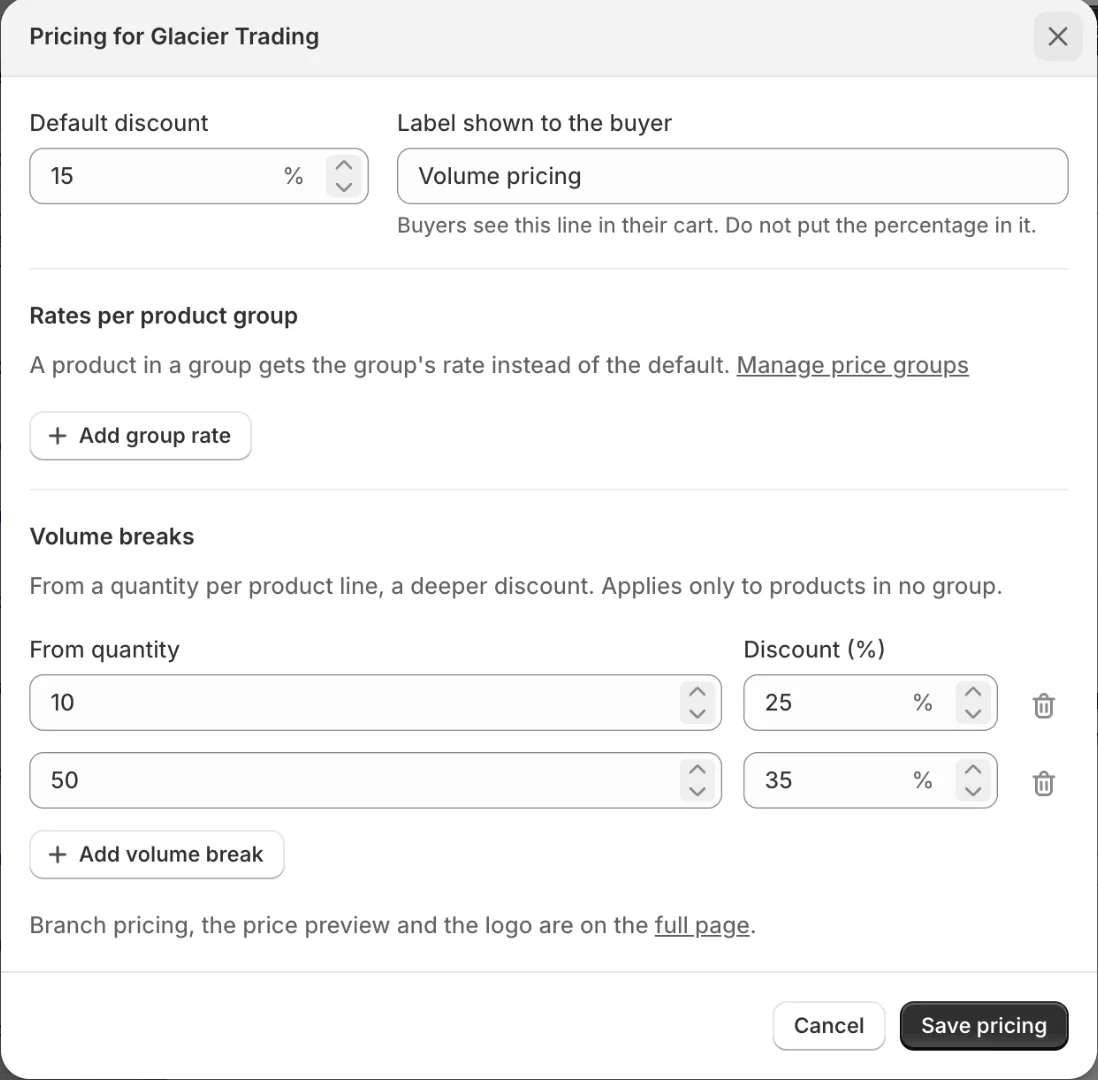
Add quantity breaks to any company. Each cart line gets the rate for the quantity ordered.
- Up to 20 breaks per rule
- Only the highest break the quantity reaches applies
- Works together with the default discount
Branches
Rules for each location
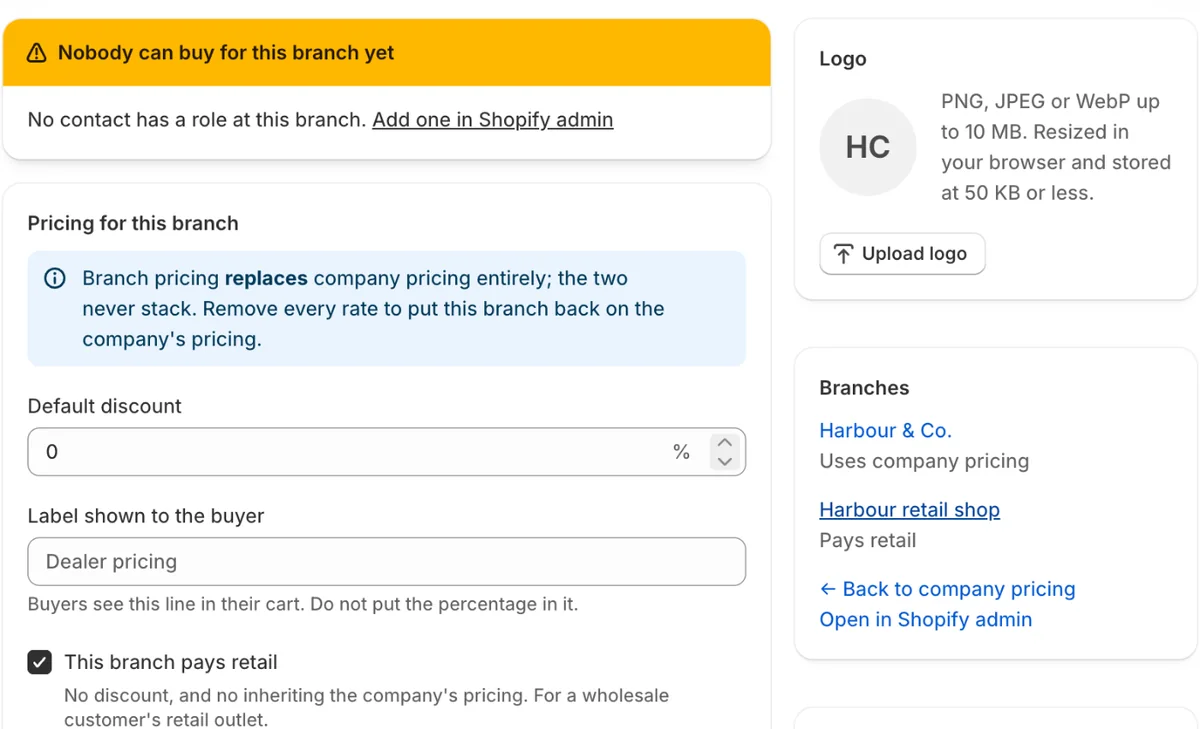
A company with several locations can price each one differently, or exclude one entirely.
- A branch rule replaces the company rule
- "Pays retail" for a customer's own retail outlet
- Everything else inherits the company's pricing
Safeguards
Warnings before a mistake costs money
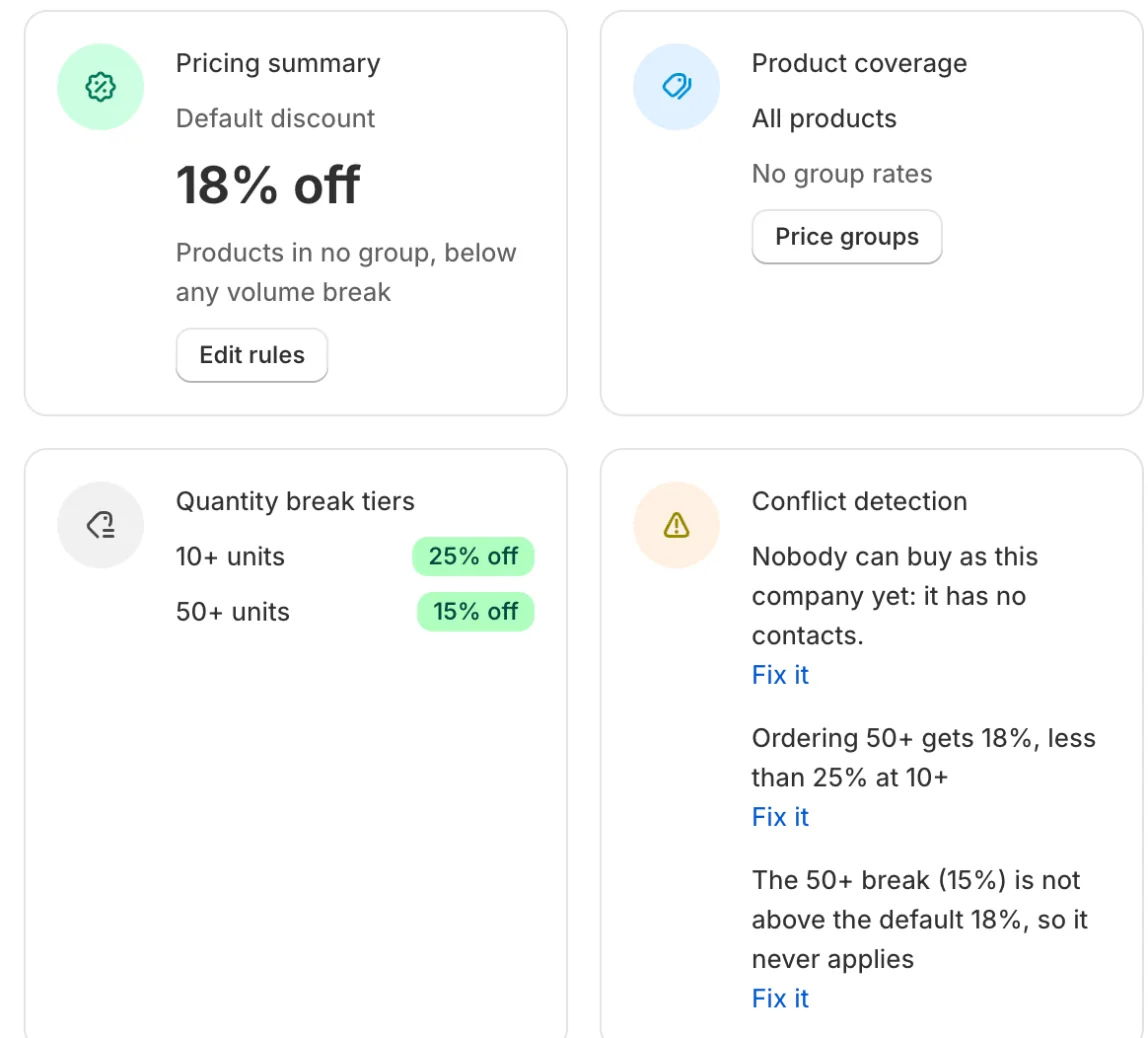
When you save, the app checks your rules and says, in plain words, what would go wrong.
- Volume breaks that charge big orders more, or never apply
- Companies nobody can buy as yet: no contact with a role
- Rates that stack on a Shopify catalog, and a discount switched off
CSV
Bring every customer in at once
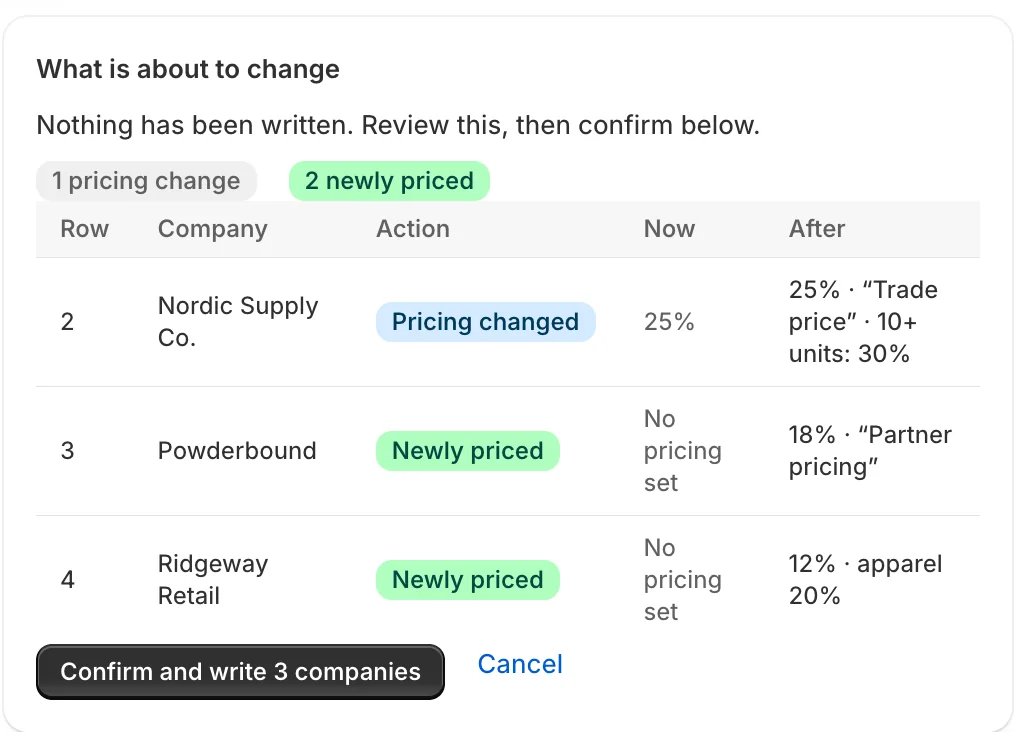
Export every company's pricing, edit it in Excel or Google Sheets, and paste it back. The app shows exactly what will change before anything is saved.
- Import up to 500 rows at a time
- Column names are checked, so a deleted column cannot shift values
- Nothing is written unless the preview still matches your store
| A | B | C | D | E | F | |
|---|---|---|---|---|---|---|
| 1 | company_id | company_name | percent_off | label | groups | quantity_breaks |
| 2 | …5133 | Nordic Supply Co. | 25 | Trade price | 10:30 | |
| 3 | …9597 | Powderbound | 18 | Partner pricing | ||
| 4 | …4509 | Ridgeway Retail | 12 | apparel:20 |
Checkout
Buyers see it in their cart
Rates are applied by a Shopify Function inside Shopify's own cart and checkout, as a discount on each line.
- No theme code and no scripts on your storefront
- Product pages keep showing your regular price
- Retail customers are never touched
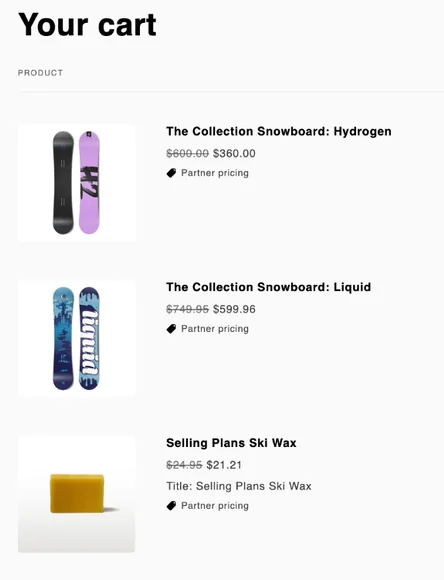
Screens are from the app on a Shopify development store. The spreadsheet is an illustration.
Why Adrix B2B Pricing
Built to be trusted with your prices.
Free
No paid plan and no charge through Shopify.
Runs inside checkout
A Shopify Function computes the discount in Shopify's own checkout, with no network calls.
No theme changes
Nothing is added to your theme, so nothing breaks when you switch themes.
No personal data
The app stores no buyer data at all. Its only records are your store's session and any company logos you upload.
Leaves nothing behind
One button clears every rule and group the app saved, before you uninstall.
A person answers
Email the people who build the app. First reply within one business day.
How it works
Price your first customer in a few minutes.
Install from the Shopify App Store
The app opens in your Shopify admin and lists your B2B companies.
Set a company's rate
Click a company and choose Edit pricing. Add group rates, volume breaks or branch rules if you need them, then save.
Check it
Read the preview table, or create a draft order for the company with "Apply all eligible automatic discounts" ticked.
Bring in the rest by CSV
Export, fill in your other companies, and import the file back.
Compared
What you can do on Basic, Grow and Advanced.
| Shopify catalogs | With Adrix B2B Pricing | |
|---|---|---|
| A price for one named company | Not on these plans | Yes, for every company |
| Price levels | 3 active catalogs, shared by B2B markets | One rule per company, and per branch |
| Different rates by product group | Fixed prices per product in a price list | Up to 50 groups, from your collections |
You can use both: a catalog for your base wholesale price, and this app for per-company rates on top. The app shows you when they stack.
FAQ
Before you install.
Which Shopify plans does it work on?
Basic, Grow and Advanced, the plans where Shopify will not activate a catalog for a single company. You need Shopify's B2B features turned on, with your customers set up as companies. The app follows your admin's language: English, Spanish, French, German, Portuguese (Brazil) or Vietnamese.
Where do buyers see the wholesale price?
In the cart and at checkout, as a discount on each line, named "Wholesale pricing" or a label you choose. Product pages keep showing your regular price.
Does it change my product prices?
No. Your products keep their prices. Rules are saved as metafields on your companies and products, and applied while the cart is calculated.
Does it combine with my other discounts?
No. Shopify applies whichever discount is better for the buyer, not both. A buyer on 37.5% wholesale pricing who also qualifies for a 30% promotion keeps 37.5%; with 10% wholesale pricing, the 30% promotion wins. A wholesale buyer never pays more than a retail customer would.
Can it raise prices for some customers?
No. The app only takes a percentage off. To charge a company more than retail, change the product price itself.
Does it work on draft orders?
Yes, when you tick "Apply all eligible automatic discounts" on the draft order. Without it Shopify applies no automatic discount at all.
I already use a catalog with a price list. What happens?
The two stack: the app's rate comes off whatever the line already costs. 20% in a catalog plus 30% here means the buyer pays 56% of retail, not 50%. The app warns you on the company's screen when this applies.
What happens when I uninstall?
Shopify keeps an app's metafields after it is removed, so the app has a button that clears every rule, group and logo it saved. Use it before uninstalling. See the privacy policy.
Give your next wholesale customer their own price.
Adrix B2B Pricing is on its way to the Shopify App Store. Questions about your setup? Write to us.